What Is the 893LM Garage Door Opener Remote — and Is It Right for You?
The 893LM garage door opener remote is a 3-button Security+ 2.0 transmitter made by LiftMaster that controls up to three garage doors, gate operators, or MyQ-enabled lighting devices from a single visor-mounted device.
Here is what you need to know at a glance:
| Feature | Detail |
|---|---|
| Buttons | 3 (each independently programmable) |
| Compatible systems | LiftMaster Security+ 2.0 with Yellow Learn Button only |
| Frequency | Tri-band: 310 / 315 / 390 MHz |
| Battery | 3V CR2032 lithium (up to 5 years) |
| Range | 150+ feet |
| Security | Rolling code encryption (1 billion+ combinations) |
| Compatible brands | LiftMaster, Chamberlain, Craftsman, Raynor (2011–present) |
| Current replacement model | L993S |
If your opener has a yellow Learn button, the 893LM will almost certainly work with it. If your opener has a purple, red, orange, or green Learn button, it will not — full stop.
For Twin Cities homeowners dealing with a lost, broken, or outdated remote, our garage door repair services cover everything from remote programming to full opener replacement. Call us at 651-702-1420 to get started.
The 893LM has been one of the most popular LiftMaster remotes for residential use because it solves a real problem: too many remotes, not enough convenience. Instead of juggling separate clickers for your main garage, a side gate, and an exterior light, one compact device handles all three — securely.
I’m David Sands, owner of AA Garage Door LLC, and over 23 years of hands-on experience installing and servicing LiftMaster systems across Wisconsin and Minnesota has made the 893LM garage door opener remote one of the most common devices I encounter on service calls. As an authorized LiftMaster dealer, I’ll walk you through everything you need to know to buy, program, and maintain this remote with confidence.
Understanding the 893lm garage door opener Remote Control
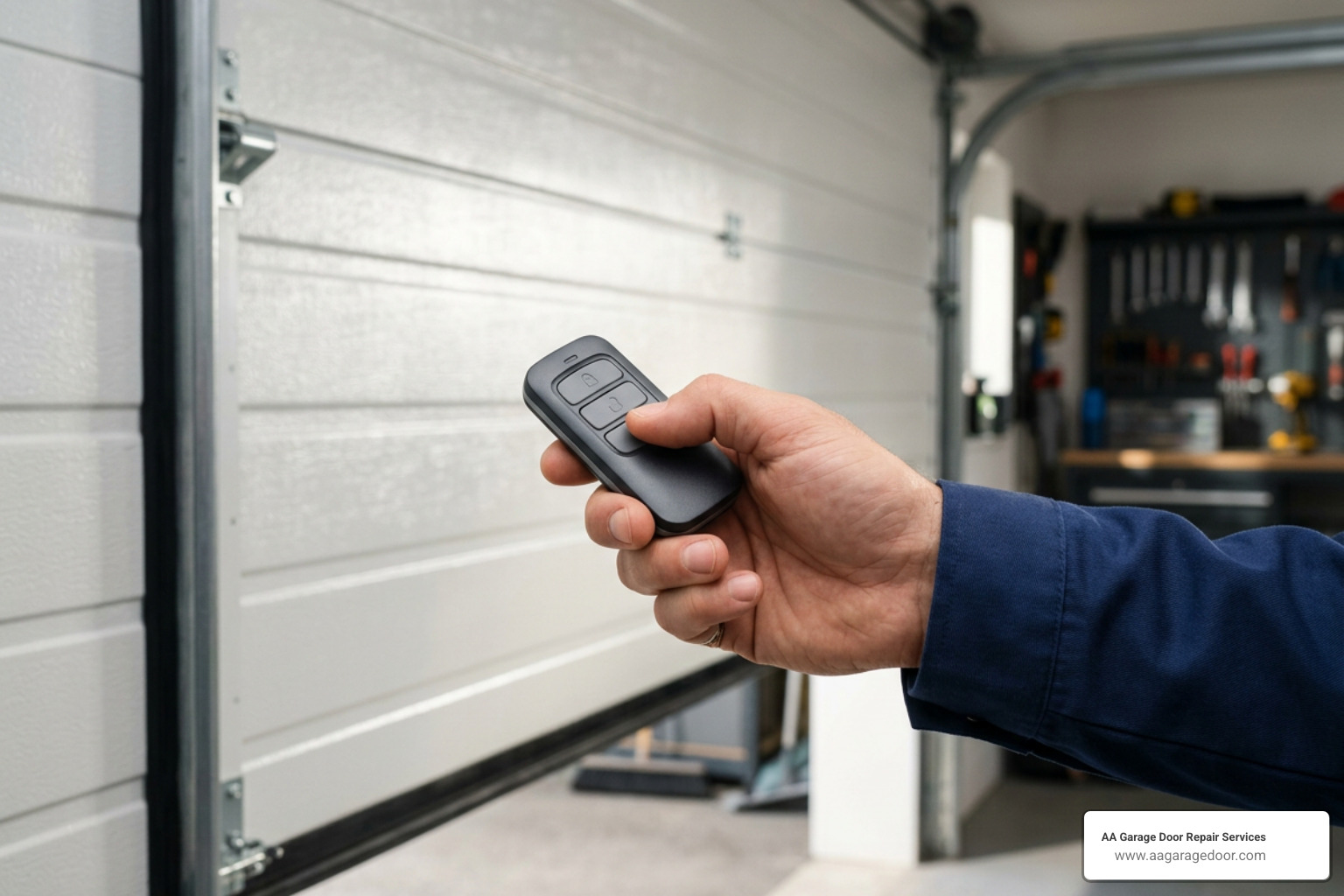
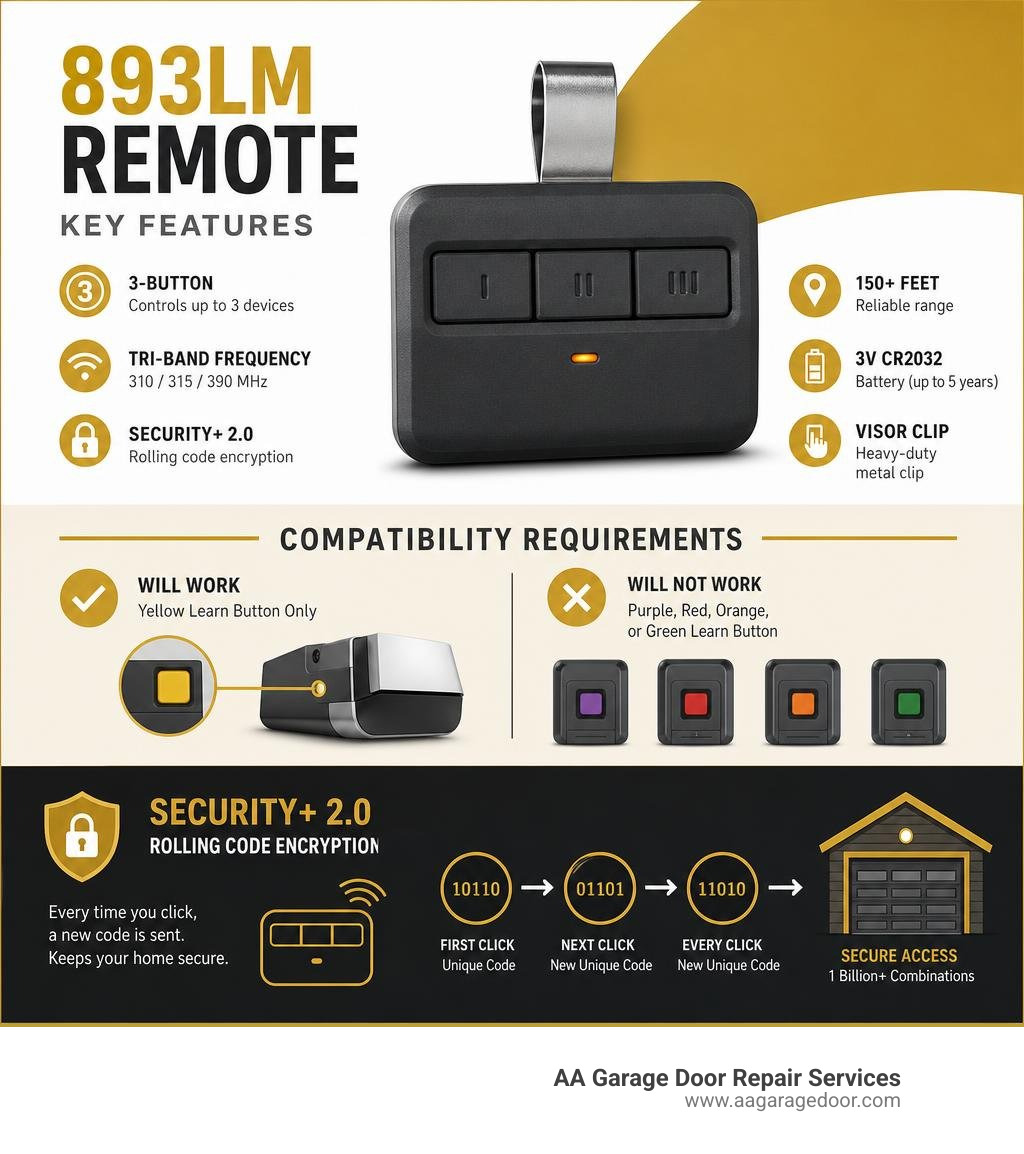
To appreciate why this pocket-sized clicker is a staple in so many vehicles, you have to look at how it is built. The 893lm garage door opener remote control is a multi-device, 3-button transmitter designed to slide onto your vehicle’s visor using an included, heavy-duty metal clip. It features a sleek, dark gray casing with structured, tactile buttons that are easy to locate by touch while you are driving.
Underneath its durable plastic shell, the 893LM utilizes tri-band frequency technology. Instead of transmitting on a single radio frequency, it broadcasts on 310, 315, and 390 MHz simultaneously. This multi-frequency approach is a major technical upgrade. Standard remotes often suffer from range drops or complete signal failure when nearby household electronics, cell towers, or military frequencies crowd the airwaves. By broadcasting across three frequencies, the 893LM ensures that at least one clear signal reaches your opener, giving you a reliable operating range of 150+ feet under typical conditions.
You can learn more about the physical build and design of this remote directly from the Garage Door Clicker | LiftMaster Canada product specifications. If you are trying to understand how this specific model fits into the wider ecosystem of garage transmitters, check out our garage door opener remote complete guide.
Compatibility Matrix: Will the 893LM Work with Your System?
Before you click “Add to Cart” or drive down to our shop, we need to clear up the single biggest point of confusion surrounding this remote: compatibility.
The 893lm garage door opener remote operates strictly on LiftMaster’s proprietary Security+ 2.0 protocol. This technology is only present on residential garage door openers and gate operators manufactured from 2011 to the present.
How can you tell if your system is compatible? You must look at the motor head hanging from your garage ceiling.
- Look for a round, Yellow Learn Button on the back or side panel.
- Look for dual yellow antenna wires hanging down from the motor housing.
If your opener has a purple, red/orange, or green learn button, this remote will not work. These older colors correspond to older radio frequencies and coding formats (such as Billion Code or older Security+ systems).
The 893LM is also the direct equivalent of the Chamberlain 953ESTD remote control, meaning it is compatible with Chamberlain and Sears Craftsman systems that utilize the yellow learn button. You can read more about how this model matches up with various systems on the Match 893lm – Garage Door Dimension page.
To help you decide if the 893LM is the right tool for your garage, or if you need a different model, we have put together this comparison table. If you are considering upgrading your entire motor unit to match modern accessories, browse our guide on liftmaster garage door openers.
Remote Control Comparison Table
| Feature | LiftMaster 891LM | LiftMaster 893LM | LiftMaster 893MAX |
|---|---|---|---|
| Number of Buttons | 1 Button | 3 Buttons | 3 Buttons |
| Learn Button Compatibility | Yellow Learn Button Only | Yellow Learn Button Only | Yellow, Purple, Red, Orange, Green |
| Security Protocol | Security+ 2.0 | Security+ 2.0 | Security+ 2.0, Security+, Billion Code |
| Primary Use Case | Single-door households | Multi-door modern systems | Homes with mixed-age openers |
| Frequency | Tri-band (310/315/390 MHz) | Tri-band (310/315/390 MHz) | Multi-frequency |
As you can see, the 893MAX is a universal remote designed to work backward with legacy systems, whereas the 893LM is a highly specialized, more affordable option built specifically for modern Security+ 2.0 units.
Step-by-Step Programming Guide
Programming your new 893lm garage door opener remote is incredibly simple and usually takes less than 60 seconds. However, you must perform the steps within a strict 30-second programming window once you activate the receiver’s memory.
Before you begin, make sure your garage door is fully closed, clear of any obstructions, and visible to you.
For the official, manufacturer-approved programming layout, you can consult the LiftMaster, 891LM, 893LM, remote control, transmitter, programming instructions manual. If you run into any issues, our how to program garage door opener with these 5 quick changes guide offers excellent troubleshooting tips.
Programming the 893lm garage door opener Using the Motor Head
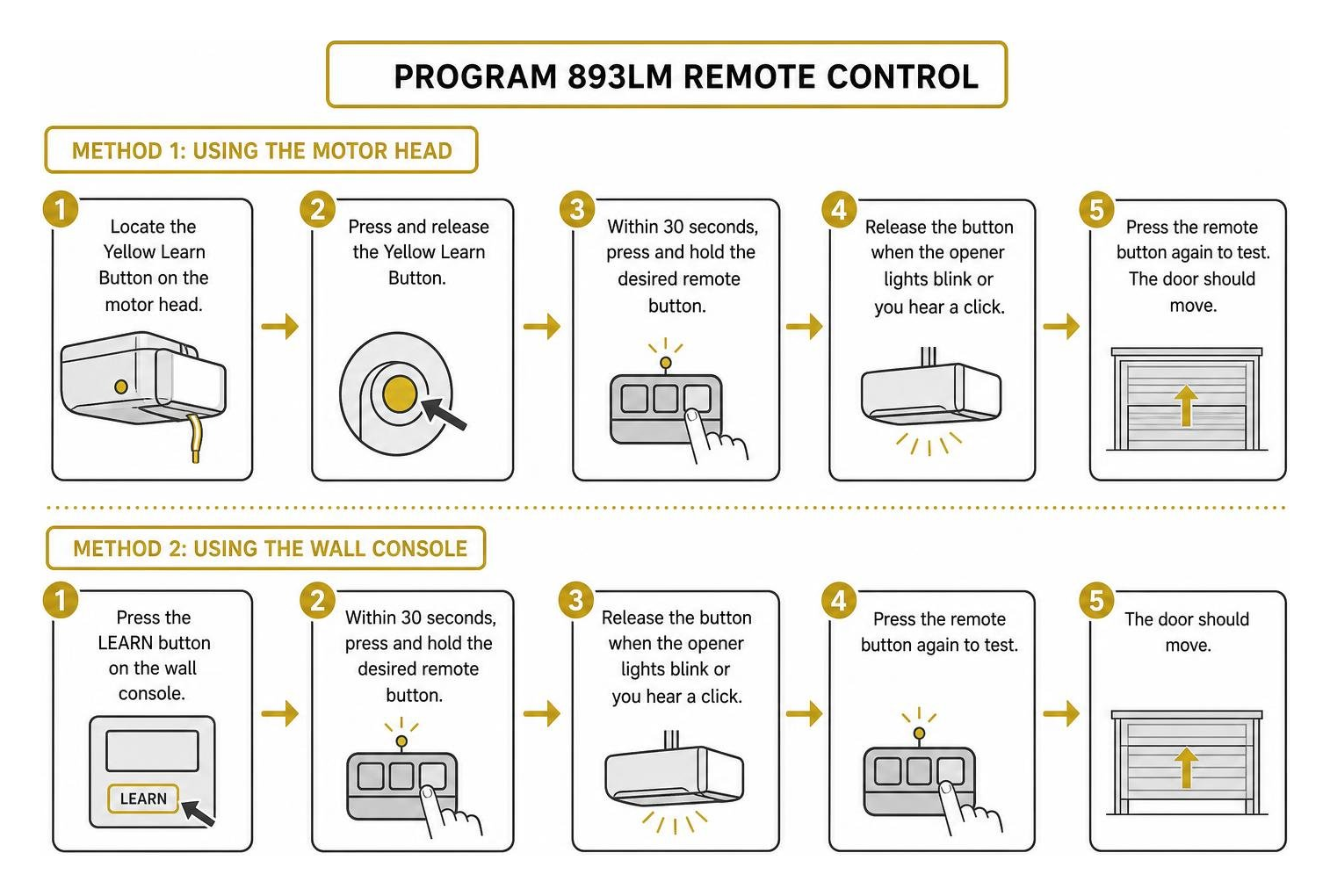
This is the most common method for pairing your remote. You will need a stepladder to reach the motor head hanging from your ceiling.
- Locate the Learn Button: Find the round Yellow Learn Button on the back or side of your garage door opener motor head.
- Press the Learn Button: Press and immediately release the Yellow Learn Button. Do not hold it down, as holding it for more than 6 seconds will erase all programmed remotes from your system. The Learn LED indicator light next to the button will glow steadily for 30 seconds.
- Press the Remote Button: Within this 30-second window, press and hold the specific button on your 893LM remote that you wish to use for this door.
- Confirm Pairing: Release the remote button when you hear two audible clicks from the motor unit or when the opener’s light bulbs blink.
- Test the Remote: Press the programmed button once more to ensure the door opens or closes smoothly.
Programming the 893lm garage door opener Using the Wall Control Panel
If you have a multi-function smart wall control panel installed in your garage, you can program your remote without climbing a ladder.
- Access Programming Mode: Press the Learn button on your wall control panel. On some smart panels, you may need to navigate through the LCD menu to “Program” -> “Remote.” On standard multi-function panels, press the Learn button twice.
- Identify the Indicator: The red or yellow LED on the wall control panel will begin flashing or remain lit, indicating the system is ready to pair.
- Press the Remote Button: Within 30 seconds, press and hold the button on your 893LM remote control that you want to program.
- Watch for Confirmation: Release the button when the garage door opener lights blink or you hear two clicks.
- Test the Setup: Press the remote button again to verify successful programming.
Advanced Security Features: Security+ 2.0 and Tri-Band Technology
Why is LiftMaster so strict about the Yellow Learn Button requirement? The answer comes down to home security. Traditional garage door remotes transmitted a fixed radio signal. If a tech-savvy intruder sat outside your home with a radio receiver, they could capture that signal and play it back later to open your garage door.
The 893lm garage door opener remote eliminates this vulnerability using Security+ 2.0 rolling code encryption.
Every single time you press a button on your 893LM remote, the transmitter and the opener’s receiver generate a brand-new, encrypted security code. The system randomly selects this code from over 1 billion possible combinations. Once a code is used, it is discarded and will never be accepted by the system again. This makes signal grabbing or code-scanning devices completely useless.
Additionally, the tri-band frequency system (transmitting on 310, 315, and 390 MHz simultaneously) prevents signal jamming. If a neighbor’s baby monitor or wireless security system is broadcasting on the 315 MHz band, your 893LM signal will still punch through on 310 or 390 MHz.
To understand how rolling codes keep your entire garage ecosystem safe, take a look at our garage door opener codes complete guide.
Battery Maintenance and Replacement Guide
The 893LM comes pre-installed with a 3V CR2032 lithium coin-cell battery designed to last up to 5 years under normal residential usage conditions. However, extreme winters in places like St. Paul, MN, or Baldwin, WI, can shorten battery life, meaning you may need to replace it sooner.
If your remote’s operating range starts to drop, or if the LED indicator light on the remote stops glowing when you press a button, it is time for a fresh battery. For more detailed maintenance and parts identification, you can read the User manual LiftMaster 893LM (English – 4 pages) or check out our general guide on the garage door opener battery.
How to Replace Your 893LM Battery
Replacing the battery is simple, and you do not even need any special tools. In fact, you can use the remote’s metal visor clip as a prying tool!
- Remove the Visor Clip: Slide the metal visor clip off the back of the remote.
- Pry Open the Casing: Insert the flat end of the visor clip (or a small flathead screwdriver) into the side seam of the remote casing. Gently twist to pry the case apart — start in the middle, then work your way to the sides.
- Remove the Old Battery: Slide the old CR2032 battery out of its holder. Always dispose of old lithium batteries safely and keep them out of reach of children.
- Check for Corrosion: If you notice white powder or green residue, wear gloves and clean the battery contacts using a toothbrush dipped in a tiny amount of household white vinegar. Let it dry completely.
- Insert the New Battery: Slide a fresh 3V CR2032 lithium battery into the compartment with the positive (+) side facing up.
- Snap the Case Closed: Align the front and back covers of the remote and press them firmly together until they snap back into place.
Where to Buy and Pricing for the 893LM Remote
The LiftMaster 893LM remote typically retails between $33 and $49, depending on where you purchase it. Buying online through wholesale or e-commerce sites can often save you money compared to buying directly from a retail distributor.
You can find listings and read customer reviews on major retail platforms, such as the LiftMaster, Garage Door Remote Control, 893LM, 3-Button … product page.
Note: While the 893LM remains highly popular, LiftMaster has introduced the L993S 3-Button Remote as its official modern replacement. The L993S offers identical programming steps, Security+ 2.0 compatibility, and multi-frequency performance in an updated, rugged housing.
If you are located in the Twin Cities metro area or Western Wisconsin, you can also purchase replacement remotes directly from our local service trucks. Our technicians carry a full inventory of LiftMaster remotes, wall consoles, and keypads, and we are happy to program them for you on-site during a routine maintenance or repair call.
Frequently Asked Questions about the 893LM Remote
Can the 893LM control multiple doors or devices?
Yes! The 893LM features three distinct buttons, and each button acts as an independent transmitter. You can program button one for your main double-car garage door, button two for a secondary single-car garage door, and button three for a compatible Security+ 2.0 gate operator or a MyQ-enabled home lighting accessory. This allows you to consolidate up to three separate devices into a single visor-mounted remote.
Is the 893LM compatible with older purple, red, or green learn buttons?
No. The 893lm garage door opener remote is strictly engineered for Security+ 2.0 systems. It operates on a completely different signal structure than legacy systems. If you attempt to pair it with an older system featuring a purple, red, orange, or green learn button, the receiver will not recognize the signal. For older systems, you will need to purchase a universal remote like the LiftMaster 893MAX.
How do you erase lost or stolen remotes from the opener’s memory?
If you lose one of your remotes or if a clicker is stolen from your vehicle, you should immediately clear the receiver’s memory to prevent unauthorized access to your home.
- Locate the Yellow Learn Button on your garage door opener motor head.
- Press and hold the Learn Button for approximately 6 seconds until the Learn LED indicator light goes out.
- This action completely erases the receiver’s memory. All programmed remotes, keyless entry keypads, and smart vehicle links (like HomeLink) will no longer operate the door.
- You must now reprogram the remotes and keypads you still have in your possession using the standard programming steps outlined above.
Conclusion
The 893lm garage door opener remote control is a highly secure, reliable, and convenient accessory for any modern LiftMaster, Chamberlain, or Craftsman garage door system. Thanks to its Security+ 2.0 rolling code technology and tri-band frequency design, it keeps your home safe from signal hackers while providing consistent operation through local radio interference.
If you need help programming your new remote, replacing a dead battery, or upgrading your older garage door opener to a modern, smart system, AA Garage Door Repair Services is here to help. Call us at 651-702-1420 to schedule an appointment.
Since 2001, we have provided fast, reliable garage door installation, maintenance, and repair services with transparent pricing and a satisfaction guarantee. We proudly serve homeowners across:
- St. Paul, MN
- Woodbury, MN
- Baldwin, WI
- Hudson, WI
To explore more remote control options or schedule a service call, visit our dedicated page for garage door remotes or find a technician near you by visiting our garage door repair near me Apple Valley location page.